
About the New Vulnerabilities dashboard
The New Vulnerabilities dashboard is specifically designed to highlight recently identified vulnerabilities across your projects. This dashboard allows users to quickly identify and assess new risks, enabling prompt action to mitigate potential threats. It provides an updated view of vulnerabilities that have been added since the last scan, ensuring you are always aware of the most current security issues.
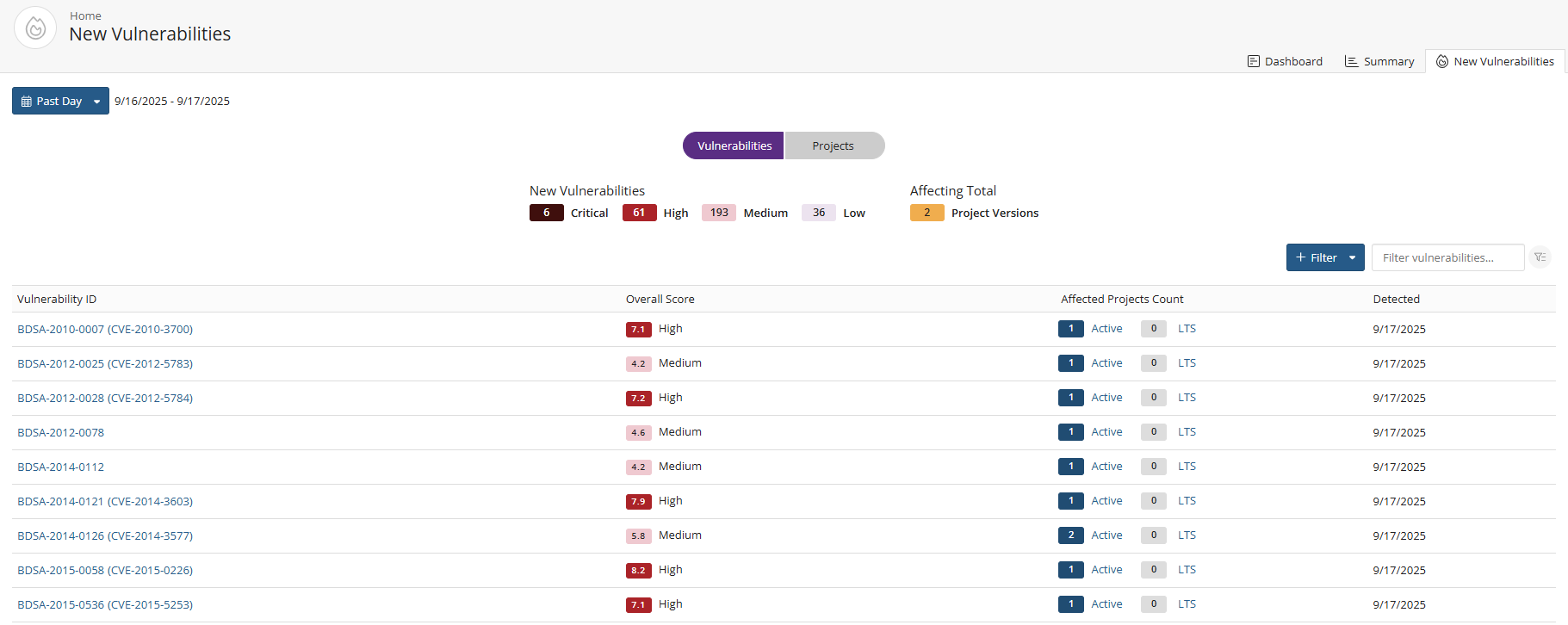
New Vulnerabilities Table
The main feature of the New Vulnerabilities dashboard is a table that displays a list of new vulnerabilities detected within the selected timeframe.
You have the option to click on the Vulnerabilities display to view detailed information about specific vulnerabilities or click on the Projects display to list all projects affected by the new vulnerabilities.
Graph Summary
A graphical summary will illustrate the count of all vulnerabilities by severity, including Critical, High, Medium, and Low.
Additionally, you can click on each severity category to view the specific vulnerabilities associated with that level.
Filtering Options
Users can filter the listed vulnerabilities by time using the following options:
- Past Day
- Past 3 Days
- Past 7 Days
- Custom range of days
Vulnerabilities view
The Vulnerability view provides you with a comprehensive overview of vulnerabilities identified within their projects. This feature allows users to easily access detailed information about each vulnerability, including its severity, affected components, and remediation status.
The table includes the following columns:
- Vulnerability ID: The unique identifier for each vulnerability. You can select any vulnerability in the list to navigate to the corresponding BDSA or CVE page for more detailed information.
- Overall Score: A score that reflects the severity and impact of the vulnerability.
- Affected Projects Count: The number of projects impacted by the listed vulnerability. You can select the Active or LTS link to see affected projects in either cycle while on the Vulnerabilities display.
- Detected: The date when the vulnerability was identified.
Projects view
The Projects view offers a detailed overview of all projects affected by newly identified vulnerabilities. This view features a table that displays key information for each project, including the Project Version, Phase, and the count of vulnerabilities categorized by severity